How accurate is AI transcription in 2026? (and what actually affects it)
A clear guide to AI transcription accuracy: how word error rate works, what raises or lowers accuracy, and realistic expectations for clean vs. messy audio.
"How accurate is it?" is the first question anyone asks about transcription — and the honest answer is: it depends far more on your audio than on the tool. This guide explains how accuracy is actually measured, what raises and lowers it, and what to realistically expect.
How transcription accuracy is measured
The industry standard is Word Error Rate (WER). It compares the machine transcript to a correct reference and counts three kinds of mistakes:
- Substitutions — a wrong word ("their" instead of "there")
- Deletions — a missing word
- Insertions — an extra word that was not said
WER is the total of those errors divided by the number of words in the reference. A 5% WER means ~95% accuracy. Most marketing claims of "99% accurate" refer to clean, studio-quality audio — real-world numbers are usually a few points lower.
Realistic accuracy by audio type
| Audio quality | Typical accuracy |
|---|---|
| Clean, single speaker, good mic (studio, dictation) | 97–99% |
| Clear meeting / interview, decent mic | 92–97% |
| Phone calls, webinars, one weak mic | 85–93% |
| Noisy room, crosstalk, far-field mic | 70–88% |
| Heavy accent + jargon + noise | can fall below 70% |
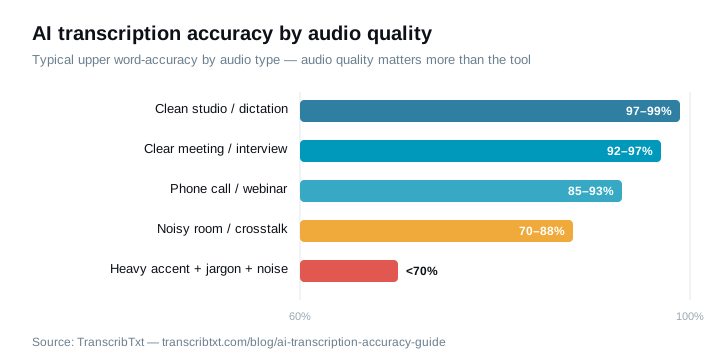
TranscribTxt runs on OpenAI's Whisper large-v3 turbo, and like every engine its results follow the audio: well-recorded sentences come back as a clean draft, and the usual misses are names and invented brand words a model has no way to know. That matches the table above: on clean audio, accuracy is near the ceiling; the variable is the recording.
What lowers accuracy (and what to do)
- Background noise — fans, traffic, cafe hum. Fix: record in a quieter space; noise is the single biggest accuracy killer.
- Distance from the microphone — laptop mics across a table lose detail. Fix: get the mic close to the speaker.
- Crosstalk — people talking over each other. Fix: encourage one-at-a-time; use speaker diarization to at least separate who said what.
- Accents and dialects — modern models handle these far better than five years ago, but strong accents still add errors.
- Names, acronyms, and jargon — a model can't spell a company or person it has never seen. Fix: a 30-second find-and-replace after transcription.
Why the engine still matters
Audio dominates, but the underlying speech-to-text model sets the ceiling. TranscribTxt uses OpenAI's Whisper large-v3 turbo, a current-generation open model that covers 99 languages with automatic detection and returns word-level timestamps (so SRT and JSON exports line up). It doesn't label speakers. Better models especially help on the hard cases — accents, overlapping speech, and domain vocabulary.
How to get the most accurate transcript
- Record in a quiet room with the mic close to the speaker.
- One person speaks at a time; use diarization for multi-speaker audio.
- Tell the tool the language if you can.
- Do a quick pass to fix names and technical terms.
- Start from the cleanest source file you have (the original recording, not a re-compressed copy).
Do those, and modern AI transcription will get you to a usable transcript in seconds — then a short human review takes it the rest of the way.
Try it on your own audio
The fastest way to judge accuracy is on your recordings, not a demo. Transcribe a file free — your first file needs no account, and a free account covers 3 files a day up to 30 minutes each, no card — and compare the result to what you hear. Every plan exports TXT and SRT, and Pro adds JSON; TranscribTxt doesn't label speakers, so for multi-speaker meetings plan a quick pass to mark who said what. See pricing.
Try TranscribTxt free
Free for files up to 30 min: your first one needs no account, a free account gets 3 a day. 99 languages.
First 30 min free · full file US$5, one-time
Try it freeFrequently Asked Questions
How accurate is AI transcription?
On clean, clearly recorded speech, modern AI transcription reaches roughly 95–99% word accuracy. Accuracy drops with background noise, heavy accents, crosstalk, low-quality microphones, and technical jargon. The audio quality matters more than the brand of tool.
What is word error rate (WER)?
Word error rate is the standard accuracy metric for transcription. It counts the substitutions, deletions, and insertions needed to turn the transcript into the correct text, divided by the number of words. A WER of 5% means about 95% accuracy.
Why is my transcript inaccurate?
The most common causes are background noise, multiple people talking over each other, a distant or low-quality microphone, strong accents, and uncommon names or technical terms. Improving the recording almost always improves the transcript more than switching tools.
How can I improve transcription accuracy?
Record in a quiet room, use a decent microphone close to the speaker, avoid people talking over each other, and specify the spoken language if the tool supports it. For names and jargon, a quick manual pass after transcription is usually faster than fighting the audio.